A Voaaro instance can serve two uses at once: the email of your client companies (one organization per company, closed sign-up) and a public service where individuals create their own mailbox on your domain, as on Gmail. Both editions allow it; no special licence is required.
Without a public service, nothing changes: the Plans and subscriptions group of the administration stays empty.
Open the public service
- Add the public domain in Domains and DNS (for example
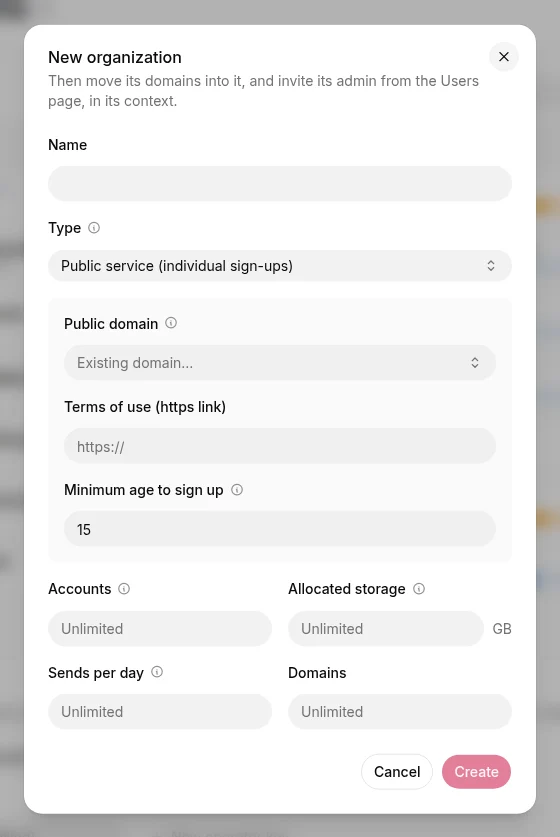
example.com) and verify it. Keep another domain for your team (example-team.com): the public domain belongs to sign-ups only. - Overview › Organizations › New organization, type Public service. Pick the public domain, give the link to your terms of use (required) and the minimum age (15 suggested, 0: no checkbox).
- The organization is created with a Free plan, the domain is moved into it, sign-up opens right away and the domain's shared
abuse@mailbox is created (you are a member).
Only one public organization per instance. The operator's organization never becomes public.
Sign-up
The Create an account page offers the public domain with stricter rules than for a company:
- at least 6 characters for the address (domain setting
signup.min_length); - sensitive names refused even in part (
support.team,abuse-desk) and look-alike digits read as letters (supp0rt,adm1n); add your brands tosignup.brand_names; - an “I am at least N years old” checkbox when a minimum age is set;
- without terms of use, sign-up does not open;
- verified external address: a 6-digit code goes to an address the person already reads; it becomes their recovery address. One external address serves one free account only (Gmail reduced to its simple form, without dots or
+tag); add disposable domains to refuse insignup.disposable_domains.
It is filled in in four steps, with a Back button at each one: the address (and the plan), the password, the check of the current email address with a code, then the final step (language, age, terms, anti-robot box).
Proof of work, per-IP limits and the instance's daily limit stay those of the usual sign-up; on top come per-network limits (/24 for IPv4, /64 for IPv6: 6 per hour, 20 per day) and a harder proof of work when sign-ups surge (+2 bits per 20 sign-ups in the hour). An address deleted from the public service is never given to anyone else.
Plans
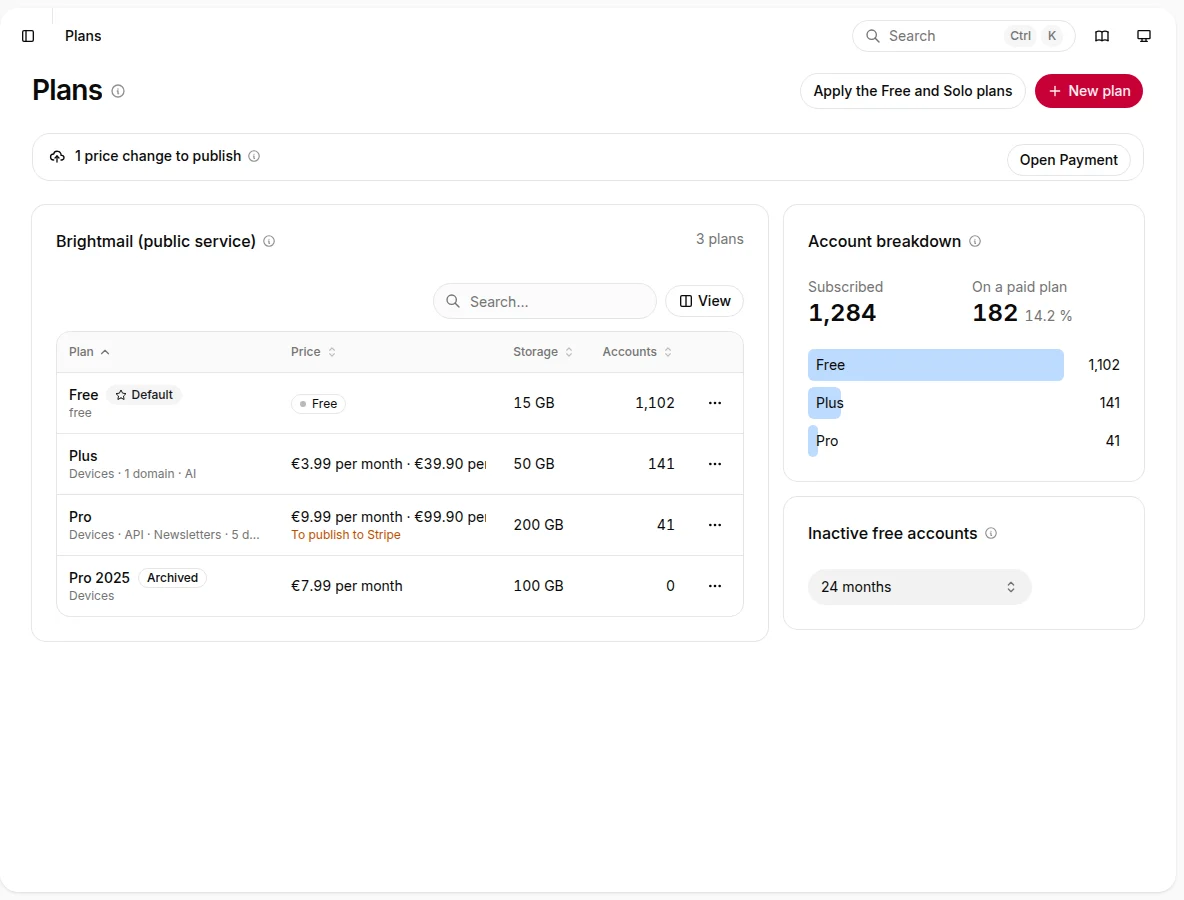
Plans and subscriptions › Plans lists the plans of the public organization. Each new user gets the default plan; you can create others, order them, hide them from the public page or archive them.
| Quota | Enforced |
|---|---|
| Mailbox storage | copied to the mailbox at each change (unless storage was set by hand for an account) |
| Recipients per 24 hours and per message | at each webmail send; per message for personal API keys |
| Secondary addresses | at each creation |
| Files shared by link | at each file |
| File transfer | size of a transfer, when it is created (0: no transfer) |
| AI assistant | requests per day with the instance key (0: no access) |
| Personal API keys | allowed or not, messages per 24 hours |
| Devices (IMAP, SMTP) | allowed or not, after the probation |
| Importing an old mailbox | allowed or not |
| Probation | days without devices or API keys after sign-up |
Beyond a quota, the response carries the error name plan_limit (with limit, plan and upgrade) and webmail offers See the plans.
Over IMAP/SMTP too: the mail server itself enforces each plan's recipients per day and per message (452 4.4.5 and 455 4.5.3 refusals), without modifying the server. The free plan therefore allows devices after its probation. The mail server's counter restarts at midnight UTC; webmail's is a rolling 24 hours.
To change an account's plan: PUT /api/admin/plans/accounts/{id} with { "plan": "<id>" } (null: the default plan).
What users see
- Settings › Plan: their plan, their gauges (storage, recipients over 24 hours, secondary addresses, files, AI) and the plans of the service.
- A public page
/#formuleslists the visible plans with a Create an account button: link to it from your website.
Accounts of your client companies never have a plan.
Anti-abuse
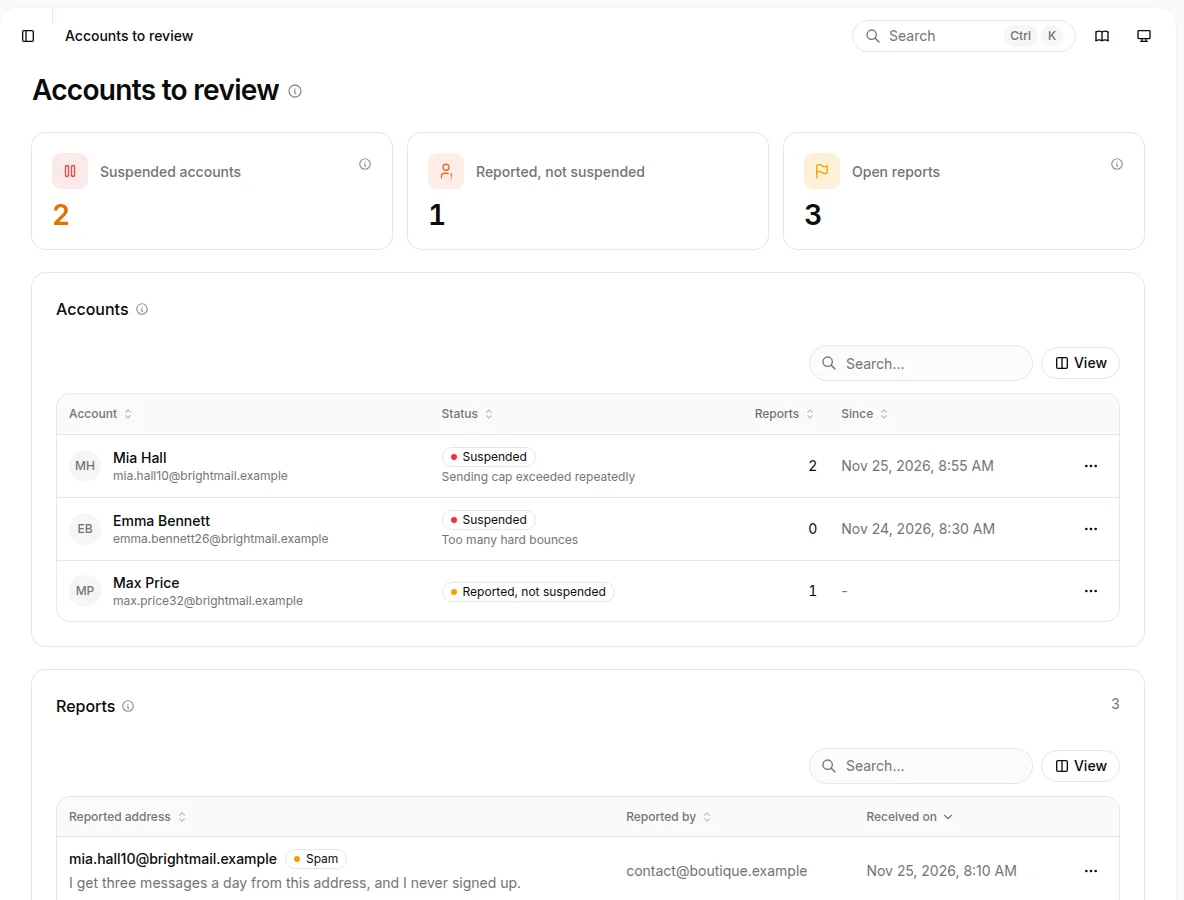
- Automatic suspension: three overruns of the daily cap within 24 hours (webmail, API keys, refusals by the mail server over SMTP), more than 10 % hard bounces over at least 50 recipients in the day, or complaints about messages sent with a personal API key: two different recipients within 24 hours, or a single complaint when it comes from a relay or from a feedback loop declared by the operator (
VOAARO_FEEDBACK_LOOPS). A complaint only counts if it carries the recipient's signed return address. The account can no longer sign in (nor use IMAP or SMTP). The user is notified at their recovery address, the operator (super admins and accounts holdingplan.manage) by email; reactivation is announced to the user too. - Reports: the public page
/#signaler(proof of work, 3 per hour per IP address) and the public domain'sabuse@mailbox. - Plans and subscriptions › Accounts to review: suspended accounts (reason, date), open reports; Reactivate and Close go to the audit log (
abuse.suspend,abuse.clear,abuse.report,abuse.report_close).
Personal domain
A plan with Personal domains above 0 lets the user add their own domain from Settings › Plan: DNS records to publish (MX, SPF, DKIM, DMARC), verification, then addresses created in Secondary addresses. The domain is placed in the public organization (it counts towards its domain quota) and only its holder can create addresses on it; they get the built-in Domain holder role (API keys, templates, sending log) and, if the plan ticks Newsletters, that domain's newsletters. They invite no one: for a team, create a company organization.
If their plan no longer allows it (move to free), new addresses are refused right away, receiving on that domain stops at the end of the downgrade period (payment setting, 14 days by default) (received messages stay in the mailbox) and the domain is removed after 90 days. Audit log: domain.personal_add, domain.personal_lapse, domain.personal_suspend, domain.personal_remove.
IPs of paying accounts
In Domains and deliverability › IPs and reputation, tick Mail of paying accounts on an IP: mail from accounts on a paid plan leaves from that IP, mail from free accounts stays on Mail of people. A listed IP of the free pool therefore does not affect paying users. With no IP ticked, nothing changes. The public domain stays shared: its reputation is protected first by the caps and automatic suspension.
Permissions
plan.read and plan.manage: the super admin holds them; a custom role can grant them, on the whole instance or on the public organization's domains. A company admin does not see plans. Each change goes to the audit log (plan.create, plan.update, plan.archive, plan.assign, organization.public_open).
To do everything in order (preparation, Stripe, VAT, deliverability, legal texts, checks before opening): Opening a public service, step by step. Subscriptions: Public service subscriptions (Stripe); export and deletion: Account export and deletion.